
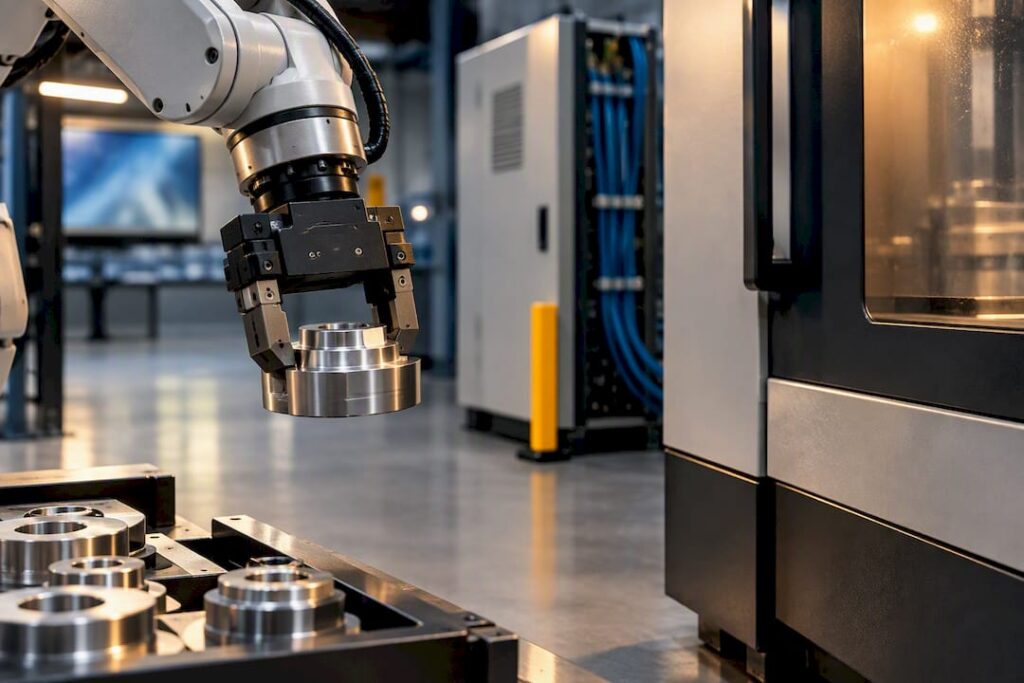
Start with a connectivity-first pilot: prove OPC UA or MTConnect on one cell, feed that data into an MES, then add robot tending and quick-change workholding. Some machine suppliers build and integrate machines to support exactly this path, targeting better spindle utilisation, predictable uptime and less scrap. Get the pilot right and the rest of the shop follows the same blueprint.
TL;DR:
- Proven connectivity with OPC UA or MTConnect into an MES is essential before automating physical processes to avoid bottlenecks.
- Starting with a representative cell, validating data flow, and simulating programs offline reduces the risk of costly mistakes during implementation.
- Standardizing fixtures and workholding early prevents longer changeover times and ensures repeatability across automated cells.
- A 90-day verification plan, including baseline measurement, connectivity testing, and stable operation, is recommended to trust the automation system.
- Focusing on spindle hours, scrap reduction, and less manual setup offers the quickest ROI, with costs including hardware, software, integration, training, and spares.
Table of Contents
- What is CNC automation integration and where should you start?
- How do you roll out CNC machine automation without overreaching?
- OPC UA vs MTConnect: which protocol fits your shop?
- Which robots, pallets and workholding actually matter first?
- Which parts of the software stack pay off first?
- How do you run a 90-day CNC automation verification plan?
- What does CNC automation actually cost, and when does it pay back?
- What goes wrong during CNC automation integration?
- How do you choose a CNC automation integration provider?
- How do you maintain and improve a CNC automation system after go-live?
- Do you need workforce training for CNC automation, and how much?
- What safety standards apply to CNC automation cells?
- Should you retrofit a legacy machine or buy new for automation?
- What Anderson has learned from real integration projects
- How Anderson Group Australia supports your integration project
- Sources
- FAQ
What is CNC automation integration and where should you start?
CNC automation integration means connecting your machine tools, workholding, robotics and shop software into one working system rather than a collection of separate boxes. Done properly, it turns a machine that runs when someone is watching it into one that keeps producing parts overnight, on weekends, and through shift changes.
Before committing capital, run a quick readiness check against your actual shop floor:
- Part mix: high-mix low-volume work needs flexible workholding and fast changeovers; high-volume runs tolerate dedicated fixturing and simpler scheduling.
- Controller capability: confirm your CNC controller supports Ethernet connectivity, external I/O, and remote program transfer — older controllers may need a gateway.
- Floor space and safety zones: robot cells need clear swept paths and, in most cases, a documented risk assessment before installation.
- Staff skills: identify who can already write G-code, run CAM software, or troubleshoot networked equipment.
- Bottleneck location: if setups eat your spindle time, start with workholding and pallets; if programming is the backlog, start with CAM automation instead.
The presence (or absence) of an Ethernet port, an accessible I/O rack, and a controller model that supports external NC-program transfer usually decides whether you’re looking at a straightforward retrofit or a more invasive rebuild.
How do you roll out CNC machine automation without overreaching?
Automating a machining centre works best as a sequence, not a single leap. Each step should prove itself before you fund the next.
- Pick one representative cell and set targets. Choose a cell that reflects your typical part mix, and define measurable objectives: OEE, cycle time, scrap rate.
- Prove connectivity first. Get machine data flowing through OPC UA or MTConnect into an MES for order-driven scheduling before you automate anything physical.
- Simulate before you spend spindle time. Use a digital twin or offline CAM simulation to validate programs, then introduce robot tending or a pallet changer.
- Standardise workholding and tooling. Add zero-point clamping and automated tool probing, then automate NC-program delivery and tool-life data.
- Scale by repeating what worked. Copy the validated cell design to the next machine rather than reinventing the layout each time.
Pro Tip: Resist the urge to automate the physical cell before your data flows properly. A robot loading a machine that’s still scheduled on a whiteboard just moves the bottleneck, it doesn’t remove it.
OPC UA vs MTConnect: which protocol fits your shop?
Both protocols solve the same underlying problem, machine data trapped in proprietary controller formats, but they solve it differently.
- OPC UA offers a standardised, object-oriented information model that works well when you’re feeding data up into an MES or SCADA system across multiple machine brands.
- MTConnect is lighter weight and purpose-built for machine-tool telemetry, making it a fast option for streaming spindle load, axis position and alarm states.
- Legacy machines without native support can usually be bridged with protocol gateways, edge IIoT boxes, or custom I/O adapters that translate raw controller signals into an OPC UA or MTConnect feed.
- Mixed fleets benefit from adopting one common CNC information model across the shop, which cuts integration testing time whenever you add the next machine.
A modular OPC UA approach has been shown to reduce implementation cost for shops running a blend of legacy and new equipment, because you’re not rebuilding the integration logic for every controller variant.
Which robots, pallets and workholding actually matter first?
Physical automation succeeds or fails on a handful of practical choices, most of which have nothing to do with the robot brand.
- Match robot type to the job: payload, reach and cycle time should drive the decision; cobots suit low-risk retrofit cells where a formal risk assessment allows fenceless operation.
- Start with a two-pallet shuttle, not a multi-pallet carousel, if your part mix is reasonably consistent, carousels add scheduling complexity you don’t need yet.
- Standardise on zero-point clamping across fixtures so changeover time drops and repeatability holds steady, even as different operators run the cell.
- Plan chip and coolant removal properly. Unattended runs fail more often from bird-nested chips or a jammed conveyor than from any software fault.
An auto pallet changer works by presenting a preloaded pallet to the machine the moment the finished one retracts, which is what actually delivers the unattended running time everyone’s chasing.
Which parts of the software stack pay off first?
Not every software upgrade deserves equal priority. Three areas consistently deliver the most practical gain early.
- Feature-based machining (FBM) in your CAM package cuts programming time on repetitive families of parts, freeing programmers for the harder jobs.
- DNC and G-code delivery, paired with tool-life monitoring, removes manual transcription errors and catches worn tooling before it scraps a part.
- MES-driven scheduling turns your machine data into order-driven production plans and gives you real OEE numbers instead of guesses.
- Digital-twin simulation validates programs and cell logic before you burn spindle time on physical prove-outs, which matters most when the cell includes a robot and fixtures you can’t easily reset.
How do you run a 90-day CNC automation verification plan?
A structured 90-day window gives you enough data to trust the cell without dragging the pilot out indefinitely.
- Weeks 1 to 2, baseline. Record current cycle times, scrap rate and manual setup time with no automation running.
- Weeks 3 to 4, connectivity prove-out. Confirm OPC UA/MTConnect data is flowing accurately into the MES before adding hardware.
- Weeks 5 to 8, integration week. Bring robot tending or the pallet changer online and run supervised.
- Weeks 9 to 11, stability run. Let the cell run with minimal supervision and track uptime against target.
- Weeks 12 to 13, optimisation. Adjust cycle sequencing and tooling based on the stability run data.
Ballbar testing after any fixture or pallet change is the fastest way to confirm the machine hasn’t lost geometric accuracy, and it should sit alongside your long-run stability checks rather than replace them. Feeding vibration, spindle current and temperature readings into the MES as condition-monitoring inputs turns those same sensors into an early warning system for predictive maintenance, catching a failing spindle bearing weeks before it stops the line.
What does CNC automation actually cost, and when does it pay back?
Budget across five buckets: hardware (robot, pallet system, fixtures), software licensing, integration engineering, staff training, and a spares allowance for wear parts.
- Fastest payback usually comes from increased spindle hours, since an unattended second or third shift multiplies output without adding floor space.
- Reduced scrap from consistent workholding and tool-life monitoring is the next fastest lever, particularly on expensive material.
- Fewer secondary operations (deburring, manual inspection) shrink labour cost per part.
- Shorter manual setup time from zero-point clamping compounds across every job change, not just the first one.
A conservative ROI model stress-tests assumptions on utilisation gains rather than best-case numbers, since an automation project sold on optimistic payback timelines tends to disappoint the finance committee.
What goes wrong during CNC automation integration?
The most common failure isn’t the robot or the software, it’s the handoff between systems that were never designed to talk to each other.
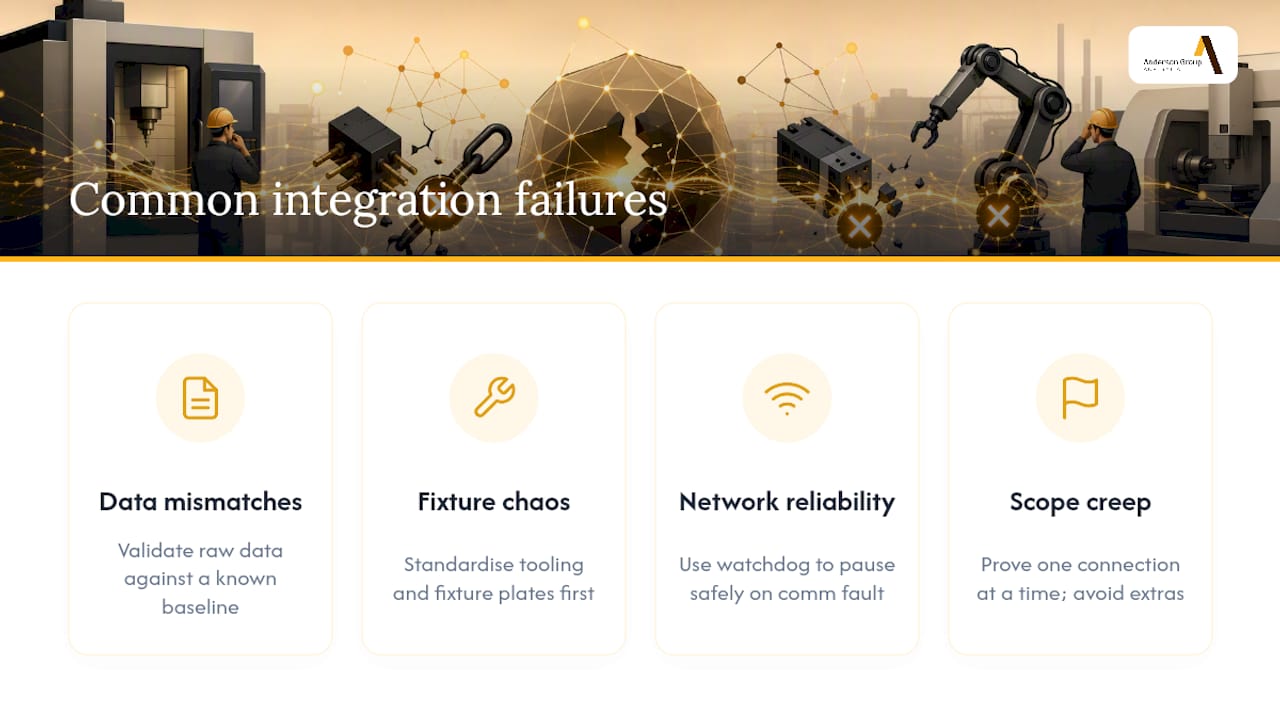
Data mismatches top the list: a controller reports spindle load in one unit, the MES expects another, and nobody notices until the dashboard shows numbers that don’t make sense. Fix this early by validating raw data against a known baseline before trusting any automated decision built on it.
Fixture and tooling chaos causes the second most common failure. If every job uses a slightly different clamping setup, a robot cell has no consistent reference point to work from, and changeover times blow out anyway. Standardising tooling and fixture plates before automating anything physical avoids this almost entirely.
Network reliability is the quiet killer. A dropped Ethernet connection mid-cycle can leave a robot holding a part with nowhere to put it. Build in a watchdog process that pauses the cell safely on a communication fault rather than letting it run blind.
Finally, scope creep sinks more pilots than technical failure does. A team that tries to automate scheduling, tooling and inspection simultaneously in one project usually ends up with three half-finished systems. Prove one connection at a time, and resist folding in “just one more feature” once the pilot is already running.
How do you choose a CNC automation integration provider?
Ask any potential supplier five direct questions before signing anything.
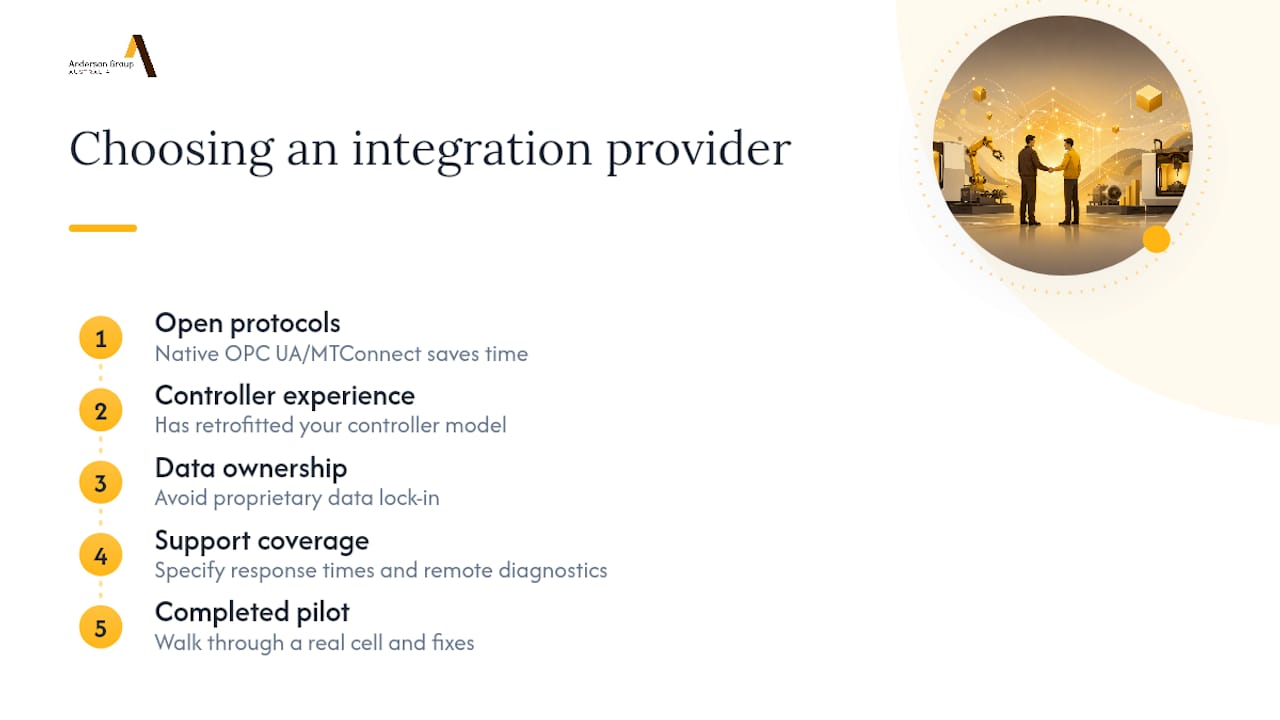
Does the equipment support open protocols natively, or does it need a gateway? Native OPC UA or MTConnect support saves integration time later; gateways work but add a failure point.
What’s their experience with your specific machine controller? A provider who has retrofitted your controller model before will spot compatibility issues you won’t think to ask about.
Who owns the data model once the system is live? Some vendors lock production data into proprietary formats that make switching MES providers expensive down the track.
What does post-installation support actually cover? Get specifics on response times and whether remote diagnostics are included, not just a general service promise.
Can they show a completed pilot, not just a brochure? A vendor who can walk you through an actual cell, including what went wrong and how it was fixed, is worth more than one with a polished sales deck and no scars.
Vendor selection matters more for automation projects than for a standalone machine purchase, because you’re buying an ongoing relationship, not a one-off transaction.
How do you maintain and improve a CNC automation system after go-live?
Automation doesn’t remove maintenance work, it changes its shape. Where a manual cell needed an operator’s eyes, an automated one needs scheduled data checks and a maintenance calendar that accounts for equipment nobody’s watching in real time.
Set a preventive maintenance schedule that covers the robot’s grippers and cabling, not just the machine tool itself, EOAT wear is easy to overlook until a part drops mid-transfer. Review condition-monitoring alerts weekly in the first few months, then adjust thresholds as you learn what’s normal noise versus an early warning sign.
Continuous improvement after integration usually means tightening cycle times incrementally rather than chasing a big second automation project immediately. Track OEE trends monthly and look for the same setup or changeover delays creeping back in, operators sometimes revert to old habits once the pressure of the pilot phase eases off.
Revisit your zero-point clamping standard every time you introduce a new part family. Fixture drift is gradual, and a plate that was accurate on day one can be off by enough to fail a Ballbar check a year later without anyone noticing until scrap climbs.
Do you need workforce training for CNC automation, and how much?
Yes, and it’s usually underestimated. The skills gap isn’t in running the robot, most operators pick that up within days, it’s in diagnosing why the cell stopped at 2am with no one on the floor.
Train at least one person per shift to read MES dashboards and interpret OEE data, not just watch for red lights. Give programmers exposure to FBM workflows in your CAM package so they’re not manually coding features that could be automated. Maintenance staff need enough networking literacy to troubleshoot a dropped OPC UA connection without calling the integrator every time.
Budget training time into the pilot schedule itself, not as an afterthought once the cell is running. Shops that treat training as a parallel track rather than a sequential one after commissioning tend to reach stable unattended operation faster.
What safety standards apply to CNC automation cells?
Robot integration changes your safety obligations, even when the robot itself is small. A formal risk assessment is standard practice before any robot cell goes live, covering pinch points, unexpected restart scenarios, and the interaction zone between the robot and any human who might enter it during maintenance.
Cobots operating without fencing still need documented risk assessments; “collaborative” describes the robot’s design, not an exemption from safety planning. Where fencing or light curtains are used, interlocks must stop the cell reliably, and that interlock logic should be tested as part of your commissioning, not assumed to work because it worked in the vendor’s demo.
Lockout/tagout procedures need updating to reflect the automated cell, a technician isolating power on the machine tool also needs to isolate the robot controller and any pneumatic supply feeding the gripper. Document these procedures clearly and train every person who might work on the cell, not just the primary operator.
Should you retrofit a legacy machine or buy new for automation?
Retrofitting makes sense when your existing machine has spare capacity, a controller that supports external NC-program transfer and remote start/stop signals, and geometry that still passes a Ballbar check. The presence of an accessible Ethernet port or I/O rack is often the deciding factor, without one, you’re adding a gateway and accepting a bit more integration risk.
Buying new makes more sense when the legacy controller genuinely can’t support automation signals, or when the machine’s condition is already marginal, automating a machine tool that’s due for a rebuild just automates its downtime too. New machines also arrive automation-ready in ways that save integration engineering hours, particularly around zero-point clamping interfaces and pallet-changer mounting.
Most shops end up doing both: automating the newer, higher-utilisation machines first, and either retrofitting or retiring the oldest equipment based on what a proper controller and geometry check reveals.
What Anderson has learned from real integration projects
Since 1972, Anderson Group Australia has worked across demanding sectors, aerospace and automotive among them, where machine reliability isn’t negotiable. That history shapes a practical bias: prove connectivity before automating hardware. One pilot integration using MTConnect and OPC UA achieved MES connectivity in weeks, not months, because the protocols did the heavy lifting.
The recurring lesson from these projects: teams that skip fixture standardisation pay for it later, and resource scheduling, not the robot, becomes the next bottleneck once physical automation is running.
— Anderson
How Anderson Group Australia supports your integration project
Some suppliers provide machines and integration engineering for shops to run this roadmap without hiring a separate systems integrator for every step. That includes production machining centres, vertical machining centres, APC-equipped models, and zero-point clamping systems designed to work together rather than being bolted on after the fact.
If you’re weighing a pilot, the practical first steps are a site review of your current controllers and floor layout, scoping a single representative cell, and setting up a 90-day verification plan with Anderson’s support behind it. Shops working in metals can start with the metal machining category, while woodworking and cabinetry operations should look at the wood machinery range. For a full view of production centres, APC options and 5-axis machines suited to automated cells, visit the machines landing page and start the conversation about your pilot.
Sources
FAQ
What is the fastest first step for CNC automation integration?
A connectivity-first pilot on one cell, proving OPC UA or MTConnect data flows correctly into an MES, is the fastest way to reduce project risk before spending on robots or pallets. Some suppliers support this pilot approach with integration engineering alongside their machine ranges.
How does a CNC pallet changer work?
A pallet changer swaps a finished part off the machine and presents a pre-loaded pallet in its place, usually in seconds, which lets the spindle keep cutting instead of sitting idle during changeover. This is the mechanism behind most unattended and lights-out machining setups.
What are the benefits of zero-point clamping?
Zero-point clamping standardises how fixtures locate on the machine table, cutting changeover time and improving repeatability across jobs and operators. It’s a foundational step before adding robot tending, since inconsistent fixturing undermines automated part transfer.
How long should a CNC automation verification plan run?
A 90-day plan covering baseline measurement, connectivity prove-out, integration, stability running and optimisation gives enough data to trust a cell for production. Ballbar testing after fixture or pallet changes should be part of that verification, not a one-off check.
Is OPC UA or MTConnect better for CNC automation integration?
Neither is strictly better; OPC UA suits high-level MES and SCADA integration with its standardised information model, while MTConnect is lighter and well-suited to streaming machine-tool telemetry directly. Many shops end up using both, depending on which system layer they’re feeding data into.