
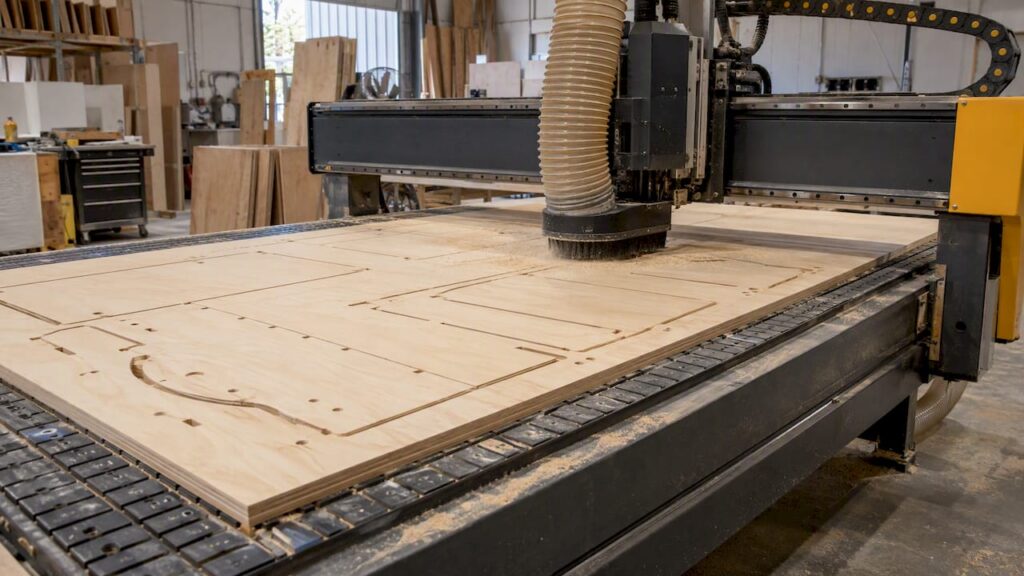
Clean CNC cutting of plywood comes down to four things: the right cutter geometry, a feed rate matched to the tool, a vacuum table that holds the sheet flat, and dust extraction that keeps up. Get those right and a nesting router will cut carcass parts with sharp veneer edges. Get one wrong and you will see tear-out, burnt edges, shifted parts or broken tools. This guide is written for Australian kitchen, cabinet, joinery and furniture manufacturers who run, or are about to buy, a CNC for sheet goods.
We sell and service CNC machinery for manufacturers. We do not offer subcontract cutting, so this is about machining plywood in your own shop.
TL;DR
- Use compression bits for through-cuts in veneered plywood, and down-cut bits for pockets and grooves. Up-cut bits tend to lift the top veneer.
- Cutting too slowly causes heat and charring, and overloading the tool risks breakage. Work from feed per tooth, not guesswork.
- A nesting router is only as good as its vacuum hold-down and dust extraction. Both need to be sized for the table and the work.
- In Australia, a CNC router needs a formal risk assessment, guarding or presence-sensing, and effective local exhaust ventilation.
- Choose the machine from your product mix and workflow, and confirm the exact model and configuration before you rely on any option.
Table of Contents
- Why plywood behaves differently from MDF or solid timber
- Choosing the cutter
- Feeds, speeds and finishing passes
- Holding the sheet: vacuum and tabs
- Dust extraction and your health obligations
- Machining plywood for cabinets: what the workflow looks like
- Choosing a machine for plywood work
- Where metal machining fits
- Our wood machinery range
- A short checklist before you cut the first sheet
- FAQ
- Sources
Why plywood behaves differently from MDF or solid timber
Plywood is a stack of veneers glued with alternating grain. A cutter meets different fibre directions at each layer, and the face veneer is thin and easy to lift. Melamine-faced board and MDF fail differently: they chip rather than splinter. Solid timber has grain in one direction and cuts differently again.
Two features of plywood cause most of the trouble:
- The face veneer. It tears when the cutter pulls fibres upward at the surface.
- The glue lines and dense cores. They generate heat when the tool rubs instead of cutting, which leads to charring.
The rest of this guide is about managing those two problems.
Choosing the cutter
The geometry of the flutes decides which way chips are pushed, and that decides which surface stays clean. The UNSW Making tooling guide explains that up-cut bits pull fibres upward and often tear the top veneer. Down-cut bits push chips downward and clean the top edge, but can cause heat-related charring in deep pockets. Many professionals prefer compression bits, which combine both geometries to give a clean edge on the top and bottom veneers.
| Cutter type | Chip direction | Best use in plywood | Watch for |
|---|---|---|---|
| Up-cut | Up, out of the cut | Slotting where the top face is hidden | Tear-out on the top veneer |
| Down-cut | Down, into the sheet | Pockets, grooves and shallow cuts where the top face shows | Chips packing in deep cuts, heat |
| Compression | Up on the lower flutes, down on the upper | Through-cuts where both faces matter | Needs enough depth to engage both geometries |
Practical guidance from CNCCookbook’s tear-out tips matches this: use a down-cut bit for pockets that do not go through the sheet, and a compression bit for full-depth cuts. It also recommends solid carbide over HSS, because HSS dulls quickly, and notes that fuzz and splintering everywhere often just means a dull bit.
This is general machining guidance, not a specification for any particular machine. Your tooling supplier can match the cutter diameter, flute count and coating to the plywood you buy.
Holes and small features
Small holes in plywood blow out at the exit. The same CNCCookbook article suggests interpolating the hole with a smaller end mill in a helical path, or using a backing board for support. On a cabinet nesting job, hinge cups, shelf-pin holes and dowel holes are usually better handled by a dedicated drilling head or a drilling machine. We cover that comparison in our article on CNC drilling versus manual drilling for cabinetry.
Feeds, speeds and finishing passes
Feeds and speeds are where most plywood problems actually start. Spindle speed influences tool temperature and wear, and feed rate sets how much material each tooth removes. The UNSW Making milling guide introduces both, and the UNSW tooling page describes the consequences. Cut too slowly and the tool rubs, generating friction, heat and edge charring, especially in dense plywood cores. Load the tool too heavily and it can break.
The working method is simple:
- Start from the tool maker’s recommended chip load for your cutter and material.
- Calculate the feed rate from spindle speed, flute count and chip load.
- Make a test cut in an offcut of the actual plywood, not a different sheet.
- Adjust in small steps and note the settings that work for each sheet type.
UNSW’s CNC basics page gives a useful comparison: for plywood, 50% radial engagement is a common starting point for clearing, against about 20% for aluminium. That is a teaching reference for a workshop router, not a production recommendation for your machine. Your spindle power, tool and material decide the real figure.
Roughing and finishing
Tool deflection and vibration are real risks in heavy roughing. The same UNSW page describes leaving a small allowance, typically 0.2 to 0.5 mm, for a separate finishing pass, instead of trying to reach final size in one aggressive cut. For plywood parts with a visible edge, such as exposed cabinet ends or furniture components, a light finishing pass on the profile often gives a cleaner edge than a single full-depth cut. Whether you need it depends on the part and the cutter, so test it.
Holding the sheet: vacuum and tabs
Plywood sheets are often not perfectly flat, and a nesting router relies on vacuum to pull the sheet onto the table. If the vacuum is weak, parts shift mid-cut. That ruins the part and can break the tool.
SafeWork NSW’s hazard identification for CNC routers is the reference for the safety side of this. Things to check on your own machine:
- Pump capacity against table area. The vacuum system must be sized for the table, and any pressure drop risks the workpiece moving.
- Spoilboard condition. A worn or saturated spoilboard leaks vacuum under small parts.
- Small part strategy. Small parts have little surface area under vacuum. Many shops use tabs, onion-skinning or a final trim pass. Which one suits you depends on the part size and your CAM software.
- Sheet quality. Warped sheets may not seal at the edges until the first cuts are made. Store sheets flat.
We do not publish vacuum pump ratings or table-hold figures as general claims. For any Anderson machine, confirm the vacuum configuration on the exact model and quote.
Dust extraction and your health obligations
Plywood dust is a health hazard, and the glue in the board adds to the concern. The SafeWork NSW resource above states that employers must carry out a risk assessment for CNC router operation, and lists high-efficiency local exhaust ventilation as an essential control for airborne wood dust. It also points to guarding or presence-sensing, regular maintenance, and PPE such as hearing and respiratory protection.
Two points from SafeWork NSW’s guidance are worth putting on the shop wall:
- Respirators only work with an effective face seal. SafeWork NSW’s PPE fact sheet for wood products manufacturing says users must be clean-shaven for the seal to work, and to check the manufacturer’s safety data sheets when selecting PPE.
- Compressed air must not be used to clean dust from skin or clothing. The hazard identification page treats this as a serious risk.
The rules differ by state and territory, and this is not legal advice. Check your state’s WHS regulator and your own risk assessment. For the local picture we have written separately on Australian wood dust exposure standards, machine safety under AS/NZS 4024, CNC dust collection and combustible dust risks. A WHS adviser or your regulator is the right person to confirm what applies to your site.
If you are comparing extraction systems, treat capacity as something to confirm per machine. Do not assume it from a machine family or table size.
Guarding matters as much as extraction. The WorkSafe WA guidance note on woodworking machinery lists basic rules such as enclosing cutters and saw blades as far as practicable and keeping machines well maintained.
Machining plywood for cabinets: what the workflow looks like
Most plywood CNC work in Australian shops is carcass and panel production: sides, tops, bottoms, shelves, drawer boxes and furniture parts. The job on the machine is a small part of the process. Our guide to cabinet CNC machining walks through the design-to-machine sequence, and the cabinet production workflow article breaks it into stages: job release, nesting, CAM and G-code, machining, then prep and assembly.

One point from that workflow article applies directly to plywood. Nesting runs depend more on upstream organisation than on the machine. A good job package has an exact nested PDF, a cut list, a hardware bill of materials and clear revision numbers. Plywood is expensive enough that cutting from an out-of-date revision costs real money.
For the nesting logic itself, see our piece on nesting-based manufacturing for cabinet shops.
Plywood-specific nesting habits
- Know your sheet. Plywood thickness varies between brands and batches, so measure and set the thickness in CAM rather than assuming nominal size.
- Grain direction. Veneered plywood has a face grain. Lock grain direction on parts that show it.
- Cut order. Cut inside features first, then outside profiles, so parts stay held by the surrounding sheet as long as possible.
- Scrap handling. Remove offcuts so they do not catch the cutter or block the dust shoe.
Choosing a machine for plywood work
The right machine depends on what else you make. Our cabinet CNC article puts it plainly: a shop focused on flat-pack carcass production benefits from a flat-bed nesting CNC, while a shop that also does solid timber joinery or complex curves should look at the broader wood machinery range.
Questions to settle before you ask for a quote:
- Sheet sizes. Which board sizes do you buy, and do you want to run full sheets?
- Daily volume. How many sheets a day, and how many job changes?
- Operations. Routing only, or routing plus drilling, grooving and labelling? Keep nesting/routing, edgebanding and drilling separate in your thinking, because they are different machines with different jobs.
- Loading and unloading. Manual handling or automation? This changes the machine and the floor plan.
- Floor space. Include infeed, outfeed and service access. A common oversight for first-time buyers is the space around the machine, not the machine. Our floor space guide suggests budgeting 1.4 times the vendor footprint.
- Dust and vacuum. The extraction and vacuum capacity for the table you choose, confirmed for that exact model.
- Service and parts. Who supports the machine locally, and what is covered. Ask any supplier to confirm the agreed scope in writing.
To cover these questions you need an exact model and configuration. A family name or an axis count does not tell you whether a machine has pallet changing, probing, rotary accessories or a particular extraction capacity. Verify each against the product page and the quote.
What is documented and what is general guidance
In this article, the cutter, feed and safety points come from the cited UNSW, SafeWork NSW, WorkSafe WA and CNCCookbook pages. They are general guidance. Specifications for any Anderson machine are not stated here. They live on the relevant product page and in your quote, and you should check them there.
Where metal machining fits
Plywood work belongs on a woodworking CNC. If your plant also machines aluminium or steel, that is a different machine class with different rigidity, coolant and tooling. The UNSW CNC basics page gives a sense of the gap in its aluminium engagement figure. Our metal machinery range covers that side, and wood-panel dust extraction should not be confused with liquid coolant systems.
Our wood machinery range
We supply CNC machinery, servicing and parts to Australian manufacturers, and the wood industry is more than 90% of our customer base. If you are cutting plywood for kitchens, cabinets, joinery or furniture, start with our wood machinery range. Tell us your sheet sizes, daily volume and operations, and we will talk through which machine suits your production and what to confirm on the product page. We help you choose machinery for your own production. We do not cut or machine parts for customers.
A short checklist before you cut the first sheet
- Cutter matched to the cut: compression for through-cuts, down-cut for pockets.
- Carbide tooling, sharp, with the chip load from the tool maker.
- Test cut on an offcut of the same plywood.
- Vacuum checked against table area, spoilboard in good condition.
- Small-part strategy decided in CAM.
- Extraction running, filters checked, guards and presence-sensing working.
- Respirator fitted and sealed, hearing protection on.
- Current job package, correct revision.
FAQ
What is the best bit for cutting plywood on a CNC?
For through-cuts where both faces matter, many professionals choose a compression bit, because it gives clean edges on the top and bottom veneers. For pockets and grooves, a down-cut bit keeps the top edge clean. Up-cut bits tend to tear the top veneer, so avoid them where the face is visible.
Why does my CNC burn plywood?
Burning usually means the tool is rubbing rather than cutting. UNSW’s tooling guidance links slow cutting to friction, heat and charring, especially in dense cores. Check that the bit is sharp, raise the feed rate to a sensible chip load, and test on an offcut.
Do I need dust extraction on a plywood CNC in Australia?
Yes. SafeWork NSW lists effective local exhaust ventilation among the essential controls for CNC router operation, alongside a risk assessment and guarding. Requirements vary by state and territory, so confirm with your WHS regulator.
Can a CNC cut plywood in one pass?
Sometimes, depending on the cutter, spindle power and material. Many shops use a roughing pass that leaves 0.2 to 0.5 mm, then a finishing pass for a better edge. Test on your own machine and plywood before setting production parameters.
Do you cut plywood parts for customers?
No. We supply CNC machinery, servicing and parts so manufacturers can machine plywood in their own shop. Contact us through our wood machinery page to discuss your application.
Sources
- CNC Router Basics, UNSW Making
- Tooling, UNSW Making
- Feeds n’ Speeds: Milling, UNSW Making
- Routers, CNC routers and spindle moulders: hazard identification, SafeWork NSW
- Personal protective equipment in the wood products manufacturing industry, SafeWork NSW
- Guidance note: Safe use of woodworking machinery, WorkSafe WA
- 16 Tips to Avoid Tearout and Splintering, CNCCookbook