
A CNC digital twin is a virtual model of your specific machine, tools and workpiece that stays tied to the real machine through documented data exchange. Most CAM simulation is not that. For a kitchen, cabinet or joinery shop running nesting and panel-processing machines, the practical question is not whether to buy a twin. It is which parts of the twin idea (accurate offline proving, controller data, condition monitoring) will pay back on your machines, and in what order. We supply CNC machinery, servicing and parts to Australian manufacturers, and this guide is written for the person deciding what to ask of the next machine.
TL;DR
- A digital twin is connected to the real machine and updated with its data. A standalone simulation that runs only from the program is a digital model, not a twin.
- A useful twin needs machine geometry and kinematics, tool and workpiece data, the G-code, and machine or production data from the controller and sensors.
- The biggest documented gains come from collision avoidance, offline proving and maintenance planning. Reported figures come mostly from metalworking and large systems, not panel shops.
- Australian research on small manufacturers points to the same advice: decide which data you need first, then build step by step.
- Before buying, confirm with the supplier what the exact model and controller can output. Never assume it from a family name.
Table of Contents
- What a digital twin is, and what simulation is not
- What data a CNC digital twin needs
- What a twin can improve, and what the evidence shows
- The practical route for a kitchen or cabinet shop
- Why many shops stall, and how to avoid it
- Choosing a machine with data in mind
- How we can help
- FAQ
- Sources
What a digital twin is, and what simulation is not
The terms get used loosely, so it helps to separate three levels. NIST researchers distinguish digital models, digital shadows and digital twins by how far data flows. An offline simulation is a digital model. A model fed by near-real-time sensor data is a digital shadow. Only a model that also feeds back to update the control parameters of the physical counterpart qualifies as a twin. By that standard, most shop-floor simulation is not yet a twin.
The Australian trade press makes the same practical point. A Channel Life report from May 2026 contrasts a twin with traditional CAM simulation. CAM gives you an animated toolpath preview, a prediction based on the program alone. A twin mirrors the kinematics of your particular machine and carries its tolerances and performance history.
The difference matters for a reason SME (the Society of Manufacturing Engineers) spells out: CAM systems and post-processors typically have no direct knowledge of the machine’s kinematics, G-codes or parameter changes. A simulation therefore cannot show how a change affects the real program or cycle time. A twin linked to a virtual CNC control can, and lets programs be proven in the office while the machine keeps cutting.
| Level | What it uses | What it tells you | Typical use in a panel shop |
|---|---|---|---|
| CAM toolpath preview | The program and the stock | Whether the toolpath looks right | Checking nesting layouts and toolpaths |
| Machine-aware simulation | Machine kinematics, travel limits, fixtures | Collisions, axis limits, fixture clashes | Proving programs before they run |
| Digital shadow | Live or logged machine data | What the machine is doing now | Monitoring spindle load, alarms, run time |
| Digital twin | All of the above, with a two-way link | Predicted and actual behaviour, with parameters updated | Planning, maintenance and process tuning |
Most Australian wood shops will find the most value in the middle two rows first. That is not a limitation of ambition. It is where the data is easiest to get and the payoff is clearest.
What data a CNC digital twin needs
NIST’s 2026 work on data requirements for a CNC machine tool twin lists what a descriptive twin needs:
- workspace data and CAD data for the machine tool, cutting tool and workpiece
- machine dynamic data such as cutting force, motor torque, energy use, vibration and noise
- the G-code program
- production plan data: parts completed, rejected or reworked, and KPIs such as availability, quality rate and OEE (overall equipment effectiveness)
The sources of that data are broad. A NIST conference paper on CNC twins names servo controls and encoders, the machine controller (axis positions, spindle speed, tool offsets, alarms, program status), external sensors such as vibration sensors and cameras, and production systems such as ERP and MES.
For a nesting or routing machine, this translates into plain questions you can ask today:
- Does the controller log alarms, spindle hours and program status in a form you can export?
- Are tool offsets and tool life recorded against each tool?
- Is axis position feedback consistent across the machine? In dusty panel shops, the type of linear scale matters, which we cover in our guide to magnetic linear scales for dusty Australian panel shops.
- Can job data (sheets cut, offcuts, rejects) be matched to the program that produced it?
If the answer to most of these is no, a twin has nothing to mirror yet. Fixing that is useful in its own right.
What a twin can improve, and what the evidence shows
The benefits reported fall into four groups.
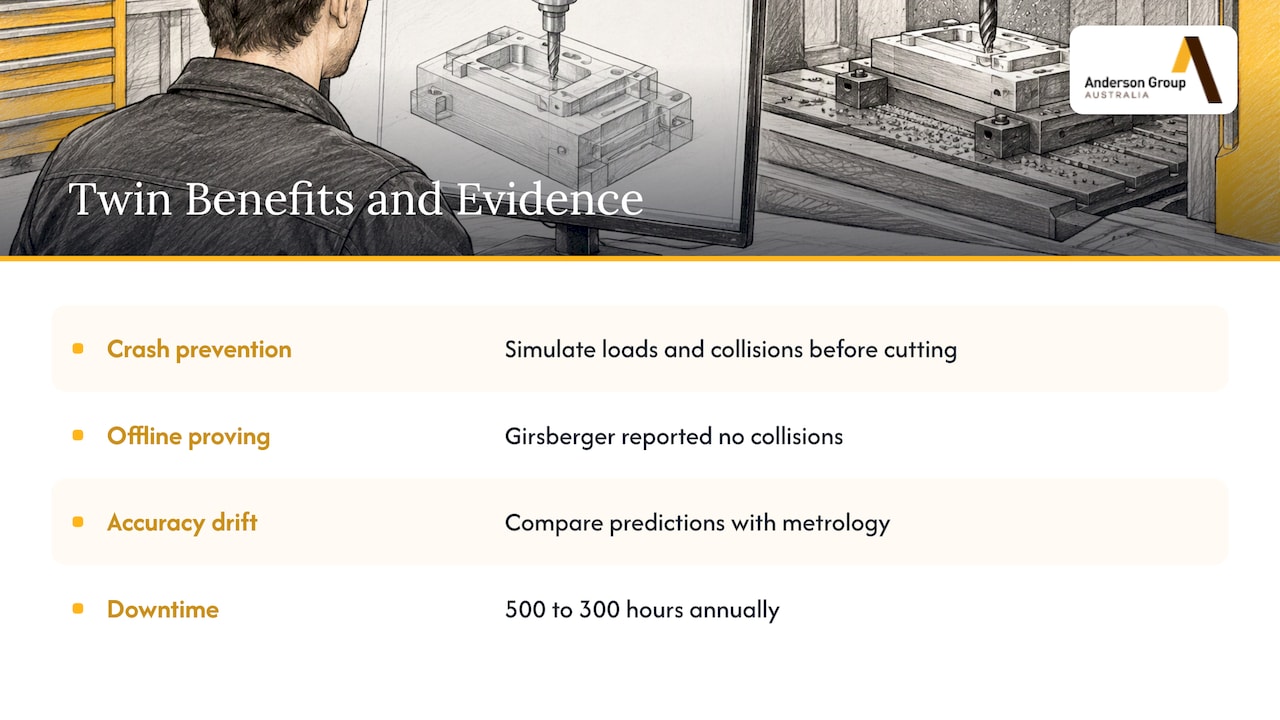
Collision and crash prevention. Channel Life notes that twins let manufacturers simulate tool movements, spindle loads and potential collisions before cutting, and tune feed rates, spindle speeds and depth of cut to improve cycle times. Siemens’ Chris Pollack describes running the control’s own decision-making in digital space, so that material removal, holder detection and fixture collisions can be simulated, as reported by Automation.com.
Offline proving in wood. A Siemens case study describes how the furniture maker Girsberger built a full 3D representation of its wood machining centre to simulate and optimise cutting offline. The reported results were less machine occupation time, fewer unsuccessful attempts and no collisions, plus the ability to program complex simultaneous multi-axis patterns. That is the closest documented parallel to a furniture shop. It is a 2016 Swiss example, so treat it as an illustration of the method rather than a benchmark.
Accuracy drift. Comparing predicted output with metrology data lets a shop see drift before parts go out of tolerance. This only works if you measure parts consistently.
Maintenance and downtime. NIST notes that a twin can extend past program validation to continuous monitoring of energy, temperature, speed, vibration and noise, supporting scheduling and preventive maintenance. A 2025 study in Frontiers in Mechanical Engineering on digital twin integration in metalworking reported annual downtime falling 40%, from 500 to 300 hours. That result comes from a metalworking setting with its own machines and baseline, so it shows what is possible, not what your shop will get.
Note the pattern: the evidence is strongest where machines are expensive to block and crashes are costly. That includes five-axis and multi-spindle work. For a flat-bed nesting machine cutting sheet goods, the same logic applies but the biggest wins are usually in consistent programs, tool life and uptime.
The practical route for a kitchen or cabinet shop
You do not need to start with a full twin. These steps use data most shops can reach, and each builds toward a twin if you later want one.
Step 1: Get the program right before it reaches the machine
Most scrap in panel work starts in the design-to-G-code chain, not at the machine. Our shop floor playbook on reducing CNC waste covers that chain, and increasing nesting productivity covers layout and sequencing. A machine-aware simulation with the correct post-processor catches clashes between tools, clamps and hold-down before a sheet is wasted.
Step 2: Log what the machine already knows
Spindle hours, alarms, tool changes and program status are the raw material of a digital shadow. Our guide to CNC machine monitoring for Australian workshops explains what to capture and how to keep it simple.
Step 3: Track tool life and breakage
Tool wear is the most common variable that a CAM preview cannot see. Use controller data for tool life monitoring and review broken tool detection options so that wear shows up in the data before it shows up in the edge quality.
Step 4: Link uptime to a plan
Once you can see where hours are lost, improving CNC uptime becomes a measured exercise. This is also where service history and parts planning feed the picture.
Step 5: Decide whether a closed-loop twin is worth it
Only after steps 1 to 4 does it make sense to ask whether feeding data back into the control is worth the effort. For most panel shops the answer will depend on machine count, part value and how often a machine is blocked by proving new programs.
Why many shops stall, and how to avoid it
RMIT’s Demystifying Industry 4.0 research looked at Australian advanced manufacturing SMEs. It found four common problems: acquiring the most relevant data, integrating systems, visualising data and extracting value. The barriers were limited understanding of Industry 4.0, low top-management buy-in, few solutions tailored to small firms and data security concerns. Interviewees agreed that connecting legacy machinery, the “last mile”, was the hardest part.
The skills point is real too. Channel Life reports that building and maintaining a twin requires people who understand both the software and the physical machine. At the same time, cloud platforms are reducing the need for expensive on-premise infrastructure, and CAM vendors are building near-twin-fidelity simulation into standard features.
RMIT’s advice is a sound checklist for a shop owner:
- Be clear about what data you need and why.
- Choose the data that most affects your KPIs and bottom line.
- Move forward incrementally.
- Build a workforce comfortable with data, and involve stakeholders early.
In practice, that means choosing one or two measures (for example, unplanned stops per month and offcut waste per sheet) and building from there.
Choosing a machine with data in mind
If you are buying a nesting or panel-processing machine, treat data access as a specification item alongside bed size, spindle and vacuum. Ask for the following in writing for the exact model and configuration you are considering:
- which controller it uses and what logs or status data it can export
- whether a machine model for simulation is available for your CAM software
- what position feedback it uses
- which options are fitted as standard and which are extras
Do not infer options such as pallet changing, probing, rotary accessories or extraction capacity from a family name or axis count. They belong to specific models and configurations, and we confirm them against the product page and the quote.
Keep the machine types distinct as well. Nesting, routing and drilling, edgebanding, panel return and metal machining each have different data and different simulation needs. Our wood machinery range is where kitchen, cabinet, joinery and furniture makers should start. If your work includes metal or aluminium milling, including five-axis, pallet-changing or double column machining, that is a separate range on our metal machinery page, where simulation of fixtures and travel limits matters more because of the cost of a crash.
How we can help
We supply CNC machinery, servicing and parts to Australian manufacturers, and more than 90% of our customers are in the wood industry: kitchen, cabinet, joinery and furniture makers. If you are planning a new nesting or panel-processing machine, or want to understand what data a particular model and controller can provide, tell us about your application and production volumes. We will match the machine to your own production and check the specifications against the product page.
We sell machinery, service and parts. We do not offer subcontract cutting or machining. You can browse our wood machinery or start from our home page to discuss your application or request a quote.
FAQ
Is CNC simulation the same as a digital twin?
No. A simulation can run with no connection to the real machine. A digital twin has a defined, documented link to the physical machine and is kept in step with its data. NIST researchers call an offline model a digital model, and reserve “twin” for systems that also update the physical machine’s control parameters.
Do I need a digital twin for a CNC nesting machine?
Not as a first step. Most panel shops get more from accurate machine-aware program checking, controller logging, tool life tracking and a clear uptime plan. Those same steps create the data a twin would later use.
What does a CNC digital twin cost?
Cost depends on the software, sensors, integration and the skills to maintain it, so we cannot give a reliable figure. The honest approach is to define the problem first (crashes, proving time, downtime), then get a scoped quote against it.
Can I add a digital twin to an older machine?
Sometimes, but connecting legacy machinery is the part Australian SMEs found hardest in RMIT’s research. What is possible depends on the controller and the data it can output. Ask us about the exact machine before planning around it.
How do I find out what data a specific Anderson machine can provide?
Tell us the model and configuration you are interested in. We will check the product page and confirm the controller and options in writing as part of your quote, rather than assuming them from the machine family.
Sources
- NIST: Shao and Kibira, digital models, shadows and twins (WSC ’21)
- Channel Life: Digital Twins and CNC, simulating before you cut (May 2026)
- SME: Digital Twins for the Machining Process (June 2022)
- NIST: Data requirements for a digital twin of a CNC machine tool (2026)
- NIST: WSC ’22 Proceedings, data sources for CNC digital twins
- Automation.com: Digital Twins Validate Real-World CNC Machines (2023)
- Siemens: Girsberger simulates and optimises wood cutting operations (2016)
- Frontiers in Mechanical Engineering: Digital twin integration in metalworking (2025)
- RMIT: Demystifying Industry 4.0 (2020)